Eonon Android Car Stereo Installation Guide
Discover how to install an Eonon Android car stereo in your vehicle. Our complete guide covers compatibility, setup, troubleshooting, and maximizing your infotainment system's performance.
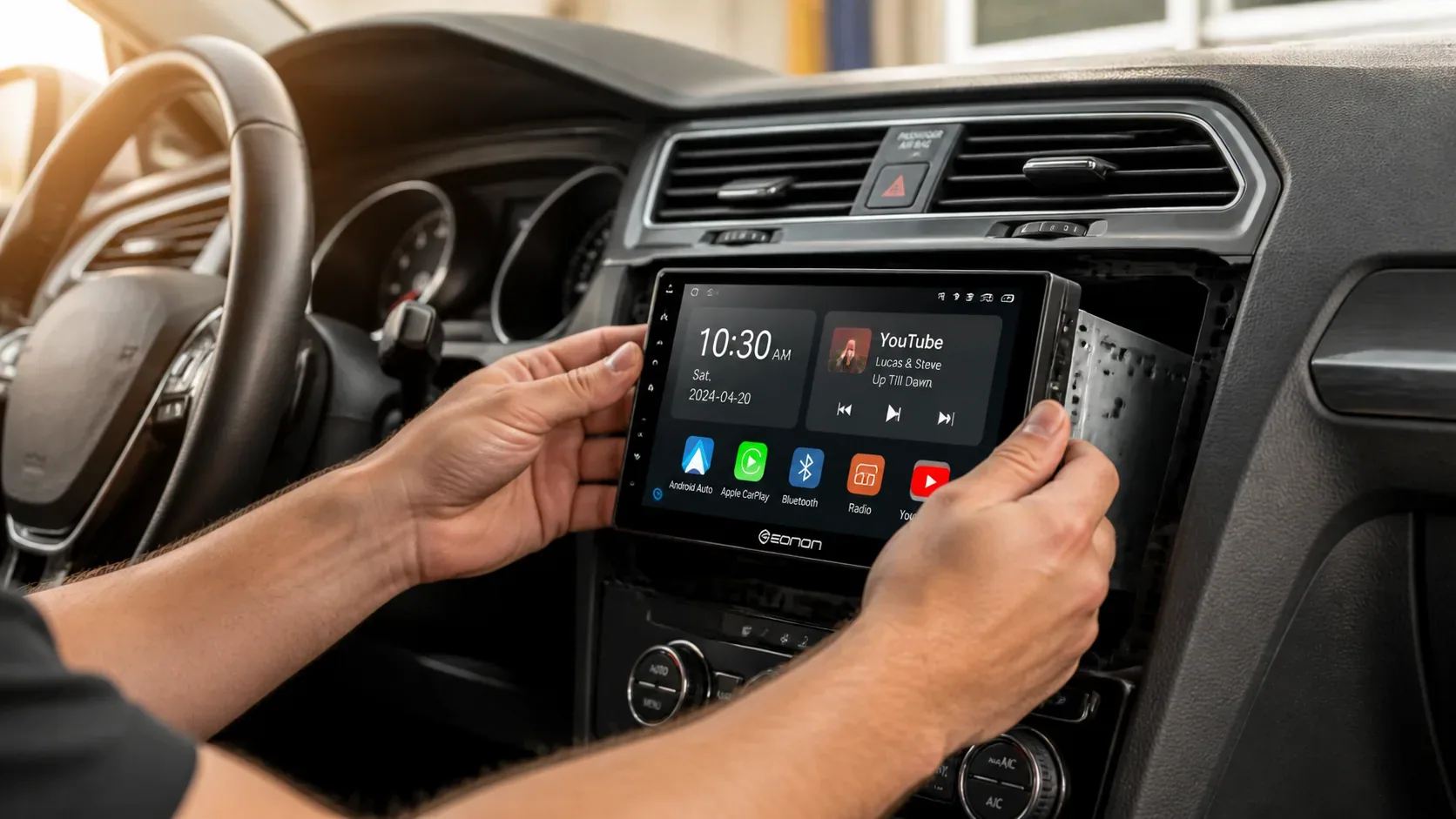
Over 60% of vehicle owners still drive with outdated factory head units that lack smartphone integration, modern navigation, and wireless connectivity. These aging systems force drivers to fumble with phones while behind the wheel, miss out on seamless music streaming, and navigate using printed directions or outdated built-in GPS. The frustration compounds during road trips, daily commutes, and any situation requiring real-time navigation or hands-free communication.
An Eonon Android car stereo offers a straightforward path to upgrading your driving experience without breaking the bank. Eonon has carved out a reputation for delivering feature-rich infotainment systems at accessible price points, packing touchscreen displays, GPS navigation, Apple CarPlay, Android Auto, and app support into units that typically cost between $250 and $500. These systems bring modern technology to vehicles of all ages, transforming your dashboard into a connected hub.
Explore Eonon Android car stereo options today and start your upgrade journey. This guide covers installation fundamentals, compatibility requirements, setup procedures, common challenges, and practical tips for getting the most from your new system. By the end, you'll have the confidence to tackle this upgrade yourself or know exactly what to expect when working with a professional installer.
Understanding Eonon Android Car Stereo Compatibility and Vehicle Fitment
Device dimensions and standard dashboard openings
Eonon Android car stereos come in standard sizes designed to fit DIN and double-DIN dashboard openings. Single-DIN units occupy roughly 2 inches of vertical space, while double-DIN units take up approximately 4 inches. Screen sizes typically range from 9 to 10.1 inches, with the larger displays extending slightly beyond the dashboard opening in some vehicles. Before purchasing, measure your existing head unit opening or consult your vehicle's specifications to ensure proper fitment.
Vehicle-specific considerations
Different vehicle brands have unique dashboard layouts and wiring conventions. Toyota and Honda owners often find straightforward compatibility with Eonon units, particularly in models from the 2000s onward. BMW vehicles frequently require additional harness adapters due to proprietary connectors. Mazda, Hyundai, and other manufacturers may have specific trim removal techniques or electrical system configurations that affect installation complexity. Research your exact vehicle make, model, and year before purchasing to avoid surprises during installation.
Steering wheel control integration and backup camera compatibility
Modern Eonon units support steering wheel control integration, allowing you to adjust volume, change tracks, and navigate menus without taking your hands off the wheel. This feature requires a compatible control module that interfaces with your vehicle's existing steering wheel switches. Backup camera compatibility is equally important—Eonon units feature dedicated video inputs for backup cameras, displaying the camera feed automatically when reverse is engaged. Verify that your vehicle's backup camera wiring is accessible or plan to install an aftermarket camera if your factory system lacks this feature.
Dashboard trim removal complexity
Some vehicles have simple trim panels held by a few screws, while others feature complex assemblies requiring careful prying and clip management. Luxury vehicles and newer models often have more involved removal procedures. Take time to research your specific vehicle's trim removal process—many manufacturers publish service manuals, and online communities share detailed guides with photos. This preparation prevents accidental damage to dashboard components during the head unit swap.
Factory harness adaptation
Your vehicle's factory head unit connects through a wiring harness specific to that model. Eonon units use standard ISO connectors, but most vehicles require a wiring adapter to bridge the gap between factory harnesses and the new unit. These adapters are inexpensive and widely available, but you must order the correct version for your vehicle. Some vehicles with amplified audio systems require additional integration modules to maintain functionality.
Screen size options and dashboard configurations
The 9-inch and 10.1-inch options offer different viewing experiences and fit considerations. Larger screens provide better visibility and touchscreen responsiveness but may protrude slightly from the dashboard opening in some vehicles. Smaller screens offer a more integrated appearance in conservative dashboard designs. Consider both aesthetics and functionality when choosing between sizes—your driving environment and personal preference should guide this decision.
Pre-Installation Preparation and Tools You'll Need
Essential tools for successful installation
Gather the following tools before starting: Phillips and flathead screwdrivers, a panel removal tool kit (plastic pry tools prevent dashboard damage), wire strippers, crimpers, and a multimeter for electrical testing. A torque screwdriver helps secure mounting brackets properly without over-tightening. Quality tools make the installation smoother and reduce the risk of stripped screws or damaged connectors.
Safety considerations and electrical precautions
Always disconnect the vehicle battery before beginning any work. This simple step prevents accidental short circuits that could damage the new head unit or harm you. Even with the battery disconnected, residual electrical charge can remain in some systems, so patience is important. Never rush the electrical work—double-check connections before powering up the system.
Documentation and reference materials
Collect your Eonon installation manual, your vehicle's wiring diagram, and any available online guides specific to your vehicle and model. Many manufacturers provide PDF service manuals that detail factory wiring color codes and connector locations. Online forums dedicated to your vehicle brand often have installation walkthroughs with photos, proving invaluable when you encounter unfamiliar components.
Workspace organization and hardware management
Set up a clean, well-lit workspace near your vehicle. Organize fasteners, connectors, and small components in labeled containers or bags so nothing gets lost. Take photos of your factory connections before disassembling anything—these images serve as reference guides when you're reconnecting wires and trying to remember which color went where.
Understanding your vehicle's existing audio system
Factory audio systems vary significantly. Some vehicles have simple passive systems with direct speaker connections, while others use factory amplifiers, equalizers, and signal processors. Understanding your current setup prevents misconnections and helps you maintain audio quality after the upgrade. If your factory system uses an amplifier, you'll need integration modules to preserve that functionality with your Eonon unit.
Time investment expectations
Plan for a 4 to 8-hour project, depending on your vehicle's complexity and your mechanical experience. First-time installers should allocate extra time for problem-solving and triple-checking connections. Breaking the installation into sessions—dash removal one day, wiring the next—reduces fatigue and decision-making errors.
Step-by-Step Installation Process
Carefully removing the factory head unit
Begin by removing any aesthetic trim pieces surrounding the factory head unit. Using plastic panel removal tools, gently pry these components away from the dashboard, working around the perimeter to release clips without breaking them. Once the trim is clear, locate and remove the mounting screws holding the factory head unit in place. Slide the unit outward slowly, being mindful of wiring harnesses behind it. Disconnect these harnesses by pressing release tabs or gently wiggling the connectors free.
Identifying and disconnecting factory wiring
Before disconnecting anything, photograph the existing connections. The power harness typically includes red (12V power), black (ground), and yellow (12V memory) wires. The speaker harness contains four pairs of wires—front left, front right, rear left, and rear right—each with positive and negative terminals. Document these connections carefully; confusion during reassembly creates non-functional audio channels.
Installing the mounting bracket
The Eonon unit comes with a mounting bracket specific to your vehicle fitment. Secure this bracket to the factory mounting points using the provided hardware. Ensure the bracket is level and firmly seated—a loose bracket creates vibration and rattling while driving. Once the bracket is secure, slide the Eonon unit into place and connect it to the bracket.
Connecting power, ground, and ignition wires
Strip and connect the red wire (12V power) to your vehicle's main power source, typically the cigarette lighter circuit or the factory head unit power wire. Connect the black wire (ground) to a clean metal surface on the chassis, removing any paint or corrosion to ensure solid contact. The yellow wire (12V memory) connects to the same power source as the red wire, preserving settings when the ignition is off. The orange or purple wire (ignition sense) connects to your vehicle's ignition switch circuit, turning the head unit on and off with the key.
Wiring speaker outputs
Connect each speaker pair from the Eonon unit to the corresponding factory speakers using the wiring adapter. If your vehicle has a factory amplifier, you'll likely need an integration module that sits between the Eonon unit and the amplifier. This module processes the Eonon's audio outputs to match the amplifier's input specifications, maintaining sound quality and system stability.
Connecting backup camera and steering wheel controls
If your vehicle has a factory backup camera, locate its wiring and connect it to the dedicated camera input on the Eonon unit. For steering wheel controls, the integration module connects to your factory steering wheel switch harness, allowing the Eonon unit to interpret button presses and respond accordingly. This requires identifying the specific wire bundle behind the steering wheel—a task that varies significantly by vehicle.
Securing connections with proper techniques
Use crimp connectors for all permanent connections, ensuring each terminal is fully inserted and the crimp is tight. If you prefer soldering, use heat shrink tubing to protect the connection. Avoid wire nuts in automotive applications; they can loosen from vibration. Bundle excess wiring using zip ties, keeping cables away from moving parts and heat sources.
Testing functionality before reassembly
Reconnect the vehicle battery and power on the Eonon unit. Verify that the display illuminates, the touchscreen responds, and all speaker channels produce sound. Check that the backup camera displays correctly and steering wheel controls are responsive. Address any issues now, before reassembling dashboard trim—catching problems at this stage prevents frustration later.
Android Setup, Configuration, and Initial Troubleshooting
Navigating initial Android setup
When you power on your Eonon unit for the first time, Android runs through its standard setup wizard. Follow the on-screen prompts to select your language, timezone, and regional preferences. The unit will ask for a Google account; entering your credentials unlocks access to the Google Play Store and your existing Android app subscriptions.
Wi-Fi connectivity and software updates
Connect to your home Wi-Fi network through the system settings. This connection enables faster app downloads and system updates. Check for available software updates immediately—manufacturers release updates that improve stability, add features, and patch security vulnerabilities. Connecting to Wi-Fi also allows the unit to download map data and app information in the background.
Pairing Bluetooth devices
Navigate to Bluetooth settings and place your smartphone in pairing mode. The Eonon unit will discover your phone within seconds. Confirm the pairing on both devices, and your phone will automatically connect whenever it's powered on and near the head unit. Most Eonon units support multiple Bluetooth connections, allowing different phones to pair simultaneously—useful for households with multiple drivers.
Configuring Apple CarPlay and Android Auto
For iPhone users, plug the phone into the USB port or pair it via Bluetooth, and CarPlay activates automatically. Android users similarly enable Android Auto through the system settings or by plugging in their device. Both platforms provide intuitive interfaces optimized for driving, displaying navigation, messaging, and audio controls prominently while hiding distracting features.
Setting up GPS navigation
Eonon units include built-in GPS receivers. Navigate to the navigation app—Google Maps is pre-installed on most models—and grant it location permissions. The first GPS lock may take a few minutes; subsequent startups are faster. Test navigation by entering a destination and confirming that turn-by-turn guidance displays correctly and updates in real-time.
Adjusting audio settings and equalizer presets
Access the audio settings menu to adjust equalizer curves, speaker balance, and sound quality parameters. Most Eonon units include presets for different music genres—rock, jazz, pop, classical—each optimizing the frequency response for that style. Experiment with these presets during your first few drives to find what suits your musical preferences and vehicle acoustics.
Addressing common startup issues
Black screens or frozen displays sometimes occur during first startup. Hold the power button for 10 seconds to force a restart. If the touchscreen is unresponsive, the display may need calibration—this option is typically found in the advanced settings menu. Recalibrating the screen realigns the touch sensors with the display, resolving responsiveness issues.
Verifying backup camera functionality
Put the vehicle in reverse and confirm the camera feed displays on the screen. The image should be clear and correctly oriented. If the camera doesn't display, check that the camera wiring is properly connected to the camera input port and that the camera is enabled in the settings menu.
Maximizing Performance and Feature Utilization
Installing and organizing applications
The Google Play Store provides access to hundreds of thousands of apps. Beyond Google Maps and Spotify—which you'll want immediately—consider Waze for community-sourced traffic updates, YouTube for passenger entertainment during parking, and specialized apps for your interests. Organize your home screen with the apps you use most frequently on the main page, keeping the secondary screens for less-used applications.
Using split-screen functionality
Many Eonon units support split-screen mode, allowing you to view two apps simultaneously. Navigation can run in the top half while music controls occupy the bottom, or any other combination you prefer. This multitasking capability requires a processor with adequate RAM—typically 4GB or higher—to maintain smooth performance.
Optimizing display brightness and color
Daytime driving often requires maximum brightness, while nighttime use calls for reduced brightness to minimize glare and driver fatigue. Most Eonon units include an ambient light sensor that automatically adjusts brightness based on external lighting conditions. You can disable automatic adjustment and set brightness manually if you prefer specific levels for different times of day.
Managing storage space
Eonon units typically include 32GB or 64GB of internal storage. This space accommodates the Android operating system, pre-installed apps, and room for your downloads. As you install additional apps and cache data, storage fills up. Periodically review installed applications and delete those you no longer use. Use cloud storage services like Google Drive or Dropbox for important files rather than storing them locally.
Customizing home screen layouts
Long-press on the home screen to access customization options. Add widgets for quick access to weather, navigation, and music controls. Rearrange app icons to match your workflow—placing frequently used apps in thumb-reach positions reduces distraction while driving. Many users prioritize navigation, music, and phone apps in prominent positions.
Exploring voice control features
Voice commands reduce manual interaction with the touchscreen. Google Assistant activates through voice commands or dedicated buttons, allowing you to control navigation, music playback, messaging, and phone calls without touching the screen. Practice common commands during parking to become proficient with voice control before relying on it while driving.
Keeping firmware updated
Manufacturers release firmware updates that enhance stability, add features, and address security vulnerabilities. Check for updates monthly or whenever notified. Updates typically install within minutes and may require a system restart. Keeping your Eonon unit current ensures you benefit from all improvements and patches.
Utilizing steering wheel controls
After proper configuration, steering wheel controls should feel natural. Volume up and down buttons adjust audio levels, next and previous buttons change tracks, and center buttons accept or decline calls. Some vehicles allow long-pressing steering wheel buttons to activate voice control or access menus. Familiarize yourself with these controls to minimize touchscreen interaction while driving.
Common Installation Challenges and Solutions
Non-standard wiring harnesses and proprietary connectors
Some vehicles use proprietary connectors that require specialized adapters. Research your vehicle thoroughly before purchasing your Eonon unit to identify any unusual electrical configurations. Aftermarket retailers sell adapters for most popular vehicles, but availability for older or unusual models may be limited. If your vehicle uses non-standard wiring, consult online forums where other enthusiasts have documented solutions.
Screen responsiveness and touchscreen calibration
Touchscreen responsiveness occasionally suffers from calibration drift—the screen's touch sensors misalign with the display, causing taps to register incorrectly. The calibration tool, found in advanced settings, corrects this by guiding you through touch points on the display. Following the calibration sequence reestablishes the proper alignment.
Bluetooth connectivity drops
Intermittent Bluetooth disconnections can result from interference or outdated drivers. Ensure your phone's Bluetooth driver is current—check for phone OS updates. Move away from sources of electromagnetic interference like overhead power lines or radio towers. If disconnections persist, unpair and re-pair your phone, as this often resolves software glitches.
Software glitches and system freezes
Occasionally, apps crash or the system becomes unresponsive. The simplest fix is a restart—hold the power button to force a shutdown and then power the unit back on. If problems persist, a factory reset restores the system to its original state, clearing corrupted settings or problematic app installations. Remember to back up any important settings or data before performing a factory reset.
Overheating concerns and ventilation
Dashboard-mounted devices experience significant heat exposure in direct sunlight. Ensure adequate ventilation around your Eonon unit by avoiding contact with nearby vents or wiring. If you live in a hot climate, consider using a sunshade to reduce interior temperatures. Modern Eonon units include thermal protection that reduces performance if temperatures exceed safe limits—this is a protective feature, not a defect.
GPS signal loss and navigation accuracy
GPS performance depends on clear line-of-sight to satellites. Buildings, tunnels, and dense tree cover disrupt signal reception. If your Eonon unit loses GPS frequently, verify that the GPS antenna connection is secure and positioned away from metallic objects that cause interference. Some vehicles have multiple metallic components in the dashboard that degrade GPS performance—repositioning the antenna often improves reception.
Steering wheel control compatibility
Certain vehicles have unusual steering wheel button configurations that require custom integration. If your steering wheel controls don't work after installation, consult your vehicle's service manual to identify which wires correspond to which buttons. The integration module may require reprogramming or reconfiguration to match your specific steering wheel's signal pattern.
When to seek professional help
If you encounter persistent electrical issues, can't resolve software problems, or lack confidence in your ability to complete the installation safely, professional installation is worth the investment. A qualified installer has specialized tools, experience with numerous vehicles, and the ability to troubleshoot complex issues efficiently. The cost typically ranges from $200 to $500 depending on complexity.
Long-Term Maintenance and System Longevity
Regular software updates
Enable automatic updates if available, ensuring your Eonon unit receives the latest improvements without requiring manual intervention. Regular updates patch security vulnerabilities, improve performance, and add new features. Check the settings menu monthly if automatic updates aren't enabled.
Cleaning the touchscreen properly
Use a microfiber cloth to gently wipe the screen, removing dust and fingerprints. For stubborn residue, lightly dampen the cloth with distilled water or screen cleaner solution. Never spray liquid directly on the display—liquid seeping into the unit causes electrical damage. Avoid abrasive cloths or harsh chemicals that scratch or degrade the screen surface.
Monitoring storage capacity
Periodically check available storage through the settings menu. When storage falls below 10% of capacity, uninstall unused apps and clear cached data. Full storage reduces performance and prevents new app installations. Cloud storage services provide alternatives for important files, freeing local storage for system operations.
Protecting against overheating
Ensure good dashboard ventilation and avoid blocking air vents near the head unit. Park in shaded areas when possible, and use sunshades to reduce cabin temperature. If your unit shows signs of thermal throttling—reduced performance or brightness during hot days—improve ventilation around the unit.
Backing up settings before major updates
Important configurations, app layouts, and customizations may reset during major firmware updates. If your Eonon unit allows, export settings or take detailed screenshots of your preferred configurations. This documentation helps you quickly restore your preferred setup if an update changes these settings.
Understanding warranty coverage
Eonon products typically include 1 to 2-year manufacturer warranties covering defects in materials and workmanship. Warranties don't cover damage from installation errors, water damage, or accidental drops. Register your product with Eonon after purchase to activate warranty coverage and receive notifications about recalls or updates.
Recognizing signs of hardware degradation
Diminishing touchscreen responsiveness, dimming displays, intermittent audio cutouts, and recurring software crashes often indicate aging hardware. Some issues resolve through software updates or resets, but others point to failing components. As your unit ages beyond the warranty period, plan for eventual replacement.
Planning for future upgrades
Technology evolves continuously. The Eonon unit you install today will likely remain functional for 5 to 7 years, but newer units will offer improved processors, better displays, and enhanced features. Begin planning replacement options as your current unit ages, particularly if your vehicle's infotainment needs change.
Eonon Android Car Stereo vs. OEM and Competitor Options
Price comparison across product categories
Eonon units typically occupy the mid-range market, priced between $250 and $500. Factory OEM replacements from manufacturers like Toyota or BMW cost significantly more—often exceeding $1,000. Premium aftermarket brands like Alpine or Sony command similar premium prices. Budget brands offer lower prices but often sacrifice build quality and feature richness. Eonon strikes a balance, delivering impressive functionality without premium pricing.
Feature parity analysis
Eonon units pack touchscreen displays, GPS navigation, Apple CarPlay, Android Auto, app support, and backup camera compatibility into their mid-range offerings. Premium systems add higher resolution displays, faster processors, and advanced acoustic features. Budget systems often lack Apple CarPlay, modern navigation, or app support. For most drivers, Eonon's feature set satisfies daily needs without unnecessary expense.
Build quality and durability
Eonon units feature solid construction with quality components, though they don't match the refinement of premium OEM systems. The touchscreen is responsive, buttons feel durable, and the overall assembly is robust. Users report longevity of 5 to 7 years under typical driving conditions. Build quality varies slightly across different Eonon models, with higher-end tiers featuring better processors and more RAM.
Customer support responsiveness
Eonon maintains customer support channels for warranty issues, compatibility questions, and technical troubleshooting. Response times vary, but most users report receiving assistance within 24 to 48 hours. Online community forums provide peer support, with experienced users answering questions and sharing solutions.
Resale value considerations
A vehicle with an upgraded Eonon system appeals to buyers who value modern technology, potentially improving resale value. However, the improvement is modest—buyers expect reasonable infotainment systems as standard features. The upgrade may add $500 to $1,000 in perceived value, though actual resale impact depends on the overall vehicle condition and buyer preferences.
Long-term software support
Eonon provides firmware updates for several years after a product's release. While support isn't indefinite like some premium brands, it's adequate for the product's operational lifespan. Eventually, support ends and no further updates are released, but the unit remains functional with existing software.
User community resources
Eonon owner forums and Reddit communities provide troubleshooting advice, installation guides, and usage tips. These communities are active and helpful, with experienced users eager to assist newcomers. YouTube contains numerous installation walkthroughs and feature demonstrations for specific Eonon models and vehicle applications.
Specific advantages for popular vehicle brands
Toyota and Honda owners benefit from wide Eonon compatibility and abundant installation resources. BMW owners appreciate the specialized adapters that maintain original functionality while upgrading infotainment. Mazda, Hyundai, and other brands have dedicated communities documenting successful installations and solutions to common challenges.
Real-World Scenarios and Use Cases
Daily commuters upgrading from factory systems
Commuters spending 10+ hours weekly in their vehicles gain significant quality-of-life improvements through wireless CarPlay or Android Auto, allowing seamless music streaming and hands-free calling. Modern GPS navigation reduces commute stress through accurate real-time traffic information. What previously required fumbling with phones now happens through voice commands and familiar smartphone interfaces.
Road trip enthusiasts leveraging navigation and app integration
Extended travel becomes more enjoyable with large touchscreen displays showing clear navigation maps and multiple app windows for music or podcasts. The Eonon unit stores offline maps, reducing dependence on cellular coverage in remote areas. Passengers can control entertainment while the driver focuses on the road.
Audiophiles and music streaming devotees
Quality sound matters to music enthusiasts, and Eonon units provide adequate audio quality for casual listening. Integration with Spotify, Apple Music, and other streaming services allows access to millions of tracks. Equalizer adjustments optimize audio for different genres, and the unit's speaker wiring supports quality aftermarket speakers for further improvements.
Tech-savvy drivers utilizing multitasking
Split-screen functionality and app multitasking appeal to drivers who want navigation running simultaneously with music controls or messaging. Advanced users customize home screens, install specialized apps for specific interests, and explore features beyond basic operation.
Safety-conscious owners implementing backup cameras
Backup cameras dramatically improve parking safety and visibility during reverse maneuvers. Parents particularly appreciate this feature for protecting children and pets during parking lot activities. Eonon units display backup camera feeds clearly, with parking lines and distance markers in some models.
Business professionals using hands-free features
Drivers managing calls, messages, and calendar commitments benefit from voice-controlled calling and messaging through Apple CarPlay or Android Auto. Voice commands allow responding to messages without touching the phone, maintaining focus on the road while maintaining professional communication.
Families enjoying passenger entertainment
Longer trips with children become more manageable with YouTube and streaming app access. Passengers can watch videos, listen to podcasts, or play audio content while driving. Some Eonon models support multiple displays or wireless mirroring for expanded entertainment options.
Classic and older vehicle owners
Owners of vehicles from the 1970s through 1990s gain access to modern technology without altering their vehicle's classic appearance. Flush-mounted Eonon units integrate into dashboards while delivering features unimaginable when the vehicles were manufactured.
Making Your Final Decision
Assessing vehicle compatibility
Before purchasing, confirm that your vehicle is compatible with your chosen Eonon model. Vehicle fitment depends on dashboard dimensions, electrical system configuration, and available mounting space. Eonon's website provides compatibility information by vehicle make, model, and year. If your vehicle isn't listed, check online forums where users with similar vehicles share compatibility experiences.
Evaluating DIY versus professional installation
Honestly assess your mechanical comfort level and available time. Installation requires moderate mechanical aptitude and patience—it's not highly technical, but mistakes create problems. If you've successfully completed other vehicle projects, DIY installation is achievable. If this is your first vehicle modification, professional installation reduces frustration and ensures quality work. The cost savings of DIY ($200-500) must be weighed against the value of your time and the risk of installation errors.
Calculating total cost including labor
If outsourcing installation, factor in labor costs of $200 to $500 depending on your location and vehicle complexity. Total investment ranges from $450 to $1,000 including the head unit and professional installation. Compare this against factory OEM replacements that often exceed $1,500, making Eonon an attractive value proposition.
Identifying priority features
Different drivers prioritize different features. Navigation enthusiasts must verify GPS functionality and map app availability. Music streaming devotees need high-quality audio and app support. Safety-conscious owners prioritize backup camera integration. Identify your top 3-5 must-have features and ensure your chosen Eonon model includes them.
Reading verified customer reviews
Customer reviews for your specific vehicle make, model, and Eonon unit reveal real-world compatibility and performance issues. Reviews mentioning successful installations boost confidence, while repeated complaints about specific problems warrant investigation. Reading multiple reviews provides perspective on common experiences rather than isolated incidents.
Understanding return and warranty policies
Before purchasing, confirm the return window—most retailers offer 30-day returns for unopened merchandise, with open returns sometimes available. Understand warranty coverage, registering your product after purchase to activate manufacturer support. Clear policies provide peace of mind if unexpected compatibility issues arise.
Considering future-proofing
Technology evolves rapidly, and infotainment systems eventually become dated. Choose a model with solid current processors and adequate RAM for smooth performance as new apps and updates arrive. Mid-range Eonon tiers with 4GB+ RAM and modern processors remain capable for 5+ years.
Connecting with owner communities
Join online forums and social media groups dedicated to Eonon users and your vehicle brand. Experienced users answer questions, share installation photos, and troubleshoot issues collaboratively. Community recommendations often highlight models best suited to specific vehicles, accelerating your decision-making.
Your Path Forward With Eonon
The decision to upgrade your vehicle's infotainment system represents more than just a hardware swap—it's about reclaiming control over your driving experience. An Eonon Android car stereo delivers impressive functionality, solid build quality, and genuine value without requiring you to sacrifice your budget or settle for outdated technology. Whether you tackle the installation yourself or hand it off to a professional, you're investing in a system that genuinely improves daily driving through better navigation, seamless smartphone integration, and modern entertainment options.
Start by confirming your vehicle's compatibility using the resources mentioned throughout this guide. Take your time with the installation process—rushing leads to mistakes that create frustration down the road. Once your Eonon unit is running, spend time exploring its capabilities and customizing it to match your preferences. The community of Eonon users is active and helpful, so don't hesitate to reach out when questions arise. Your upgraded dashboard awaits.
Start your Eonon Android car stereo upgrade today and transform your driving experience.